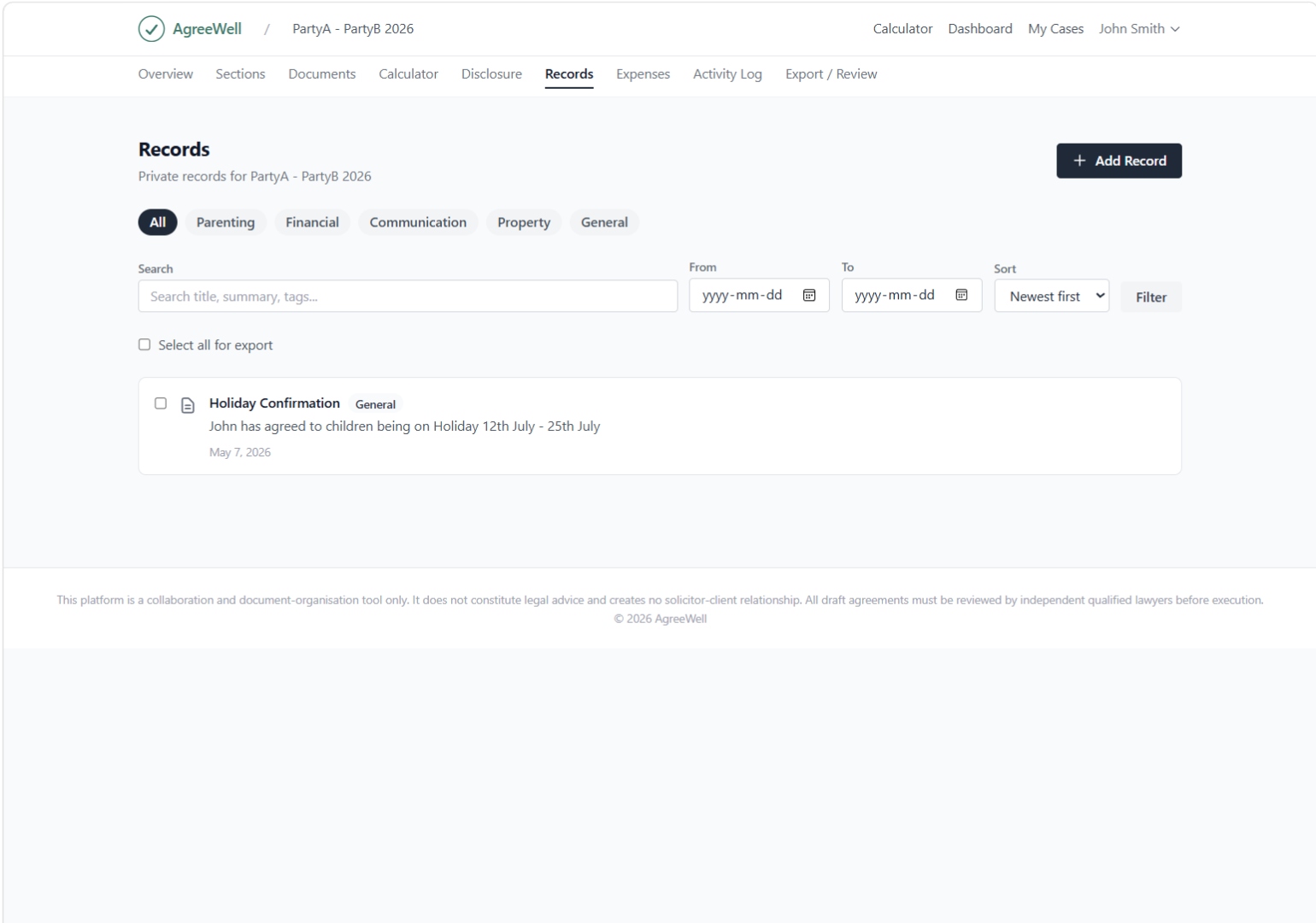
Separation generates a steady stream of dates, agreements, expenses, schedule changes, and conversations. AgreeWell helps you keep them organized — so you can find what you need, share what's relevant, and stay focused on practical outcomes rather than paperwork.
AgreeWell is an organizational tool. It is not a law firm and does not provide legal advice.
Most separations span months. Decisions get made in conversations, schedules shift, expenses come up, and documents pile up across email, text threads, and folders. When records are scattered, small questions become stressful — and important details get lost.
Keeping records organized isn't about preparing for conflict. It's about reducing friction. When both people can point to the same parenting schedule, the same list of shared expenses, or the same agreement summary, conversations stay practical. Mediators and lawyers can pick up faster. You spend less time searching and more time moving forward.
These are the everyday organizational gaps we hear about most often. None of them require a legal mindset to solve — they just need a structured place to live.
Schedule changes and small agreements live across text, email, and verbal calls — easy to lose, hard to summarize later.
Shared expenses end up in email attachments, photo rolls, and shoeboxes, making reimbursement harder than it should be.
Without a shared timeline, both people remember key decisions slightly differently, and small disagreements grow.
Drafts of parenting schedules and budgets multiply, and it's unclear which version is current.
Each time you talk to a mediator or lawyer, you re-explain the same chronology from memory.
You'd like a place to keep your own thoughts and reminders without sharing every line with the other person.
AgreeWell groups records by what they're for — parenting, finances, agreements, communication summaries — so each item has a clear place and is easy to find later.
Instead of one giant pile of files, records are sorted into clear categories: parenting schedule, shared expenses, agreements, communication summaries, and personal notes. Each category has a consistent layout, so you always know where something belongs.
Receipts, school letters, mediator notes, or screenshots of confirmed schedule changes can be attached directly to the record they relate to. No more hunting through camera rolls or email folders for that one PDF — it lives next to the entry it documents.
Common formats are supported (PDF, images, and standard document types), and each attachment is tied to its entry rather than floating in a generic folder.
Records are searchable by keyword, date range, category, and tag. If you need every expense from August, or every entry tagged "school", it's a couple of clicks — not an afternoon of scrolling.
You don't need to set aside hours. The goal is a few minutes here and there — adding entries as things happen, so the timeline reflects reality without becoming a chore.
When something happens — a schedule change, a shared expense, a confirmation — add a short entry. A title and date is enough to start.
Pick the right category (parenting, finance, agreement, note) and add tags like "school" or "medical" so related entries group naturally.
Drop in receipts, letters, or screenshots that relate to the entry. Each file lives with the record it belongs to.
Some entries are shared with the other person, some stay private to you, and some are exported for a mediator or lawyer when needed.
A short monthly review keeps the timeline tidy, catches anything missed, and makes professional meetings easier to prepare for.
AgreeWell is designed for people who want to keep separation practical and cooperative. Records are a tool for clarity, not a way to keep score.
That shows up in small design choices throughout the app. Entries focus on facts (date, what was agreed, amount, attachment) rather than commentary. Shared records are visible to both people, so there's no hidden file in either direction. The goal is always to reduce ambiguity — which tends to reduce conflict too.
Records and a clear chronology are most valuable when they help both people see the same picture — and free up energy for the practical decisions that move things forward.
Whether you're working with a mediator, a collaborative lawyer, or preparing for a one-time legal consultation, organized records save everyone time — and save you money.
Export a structured summary. Generate a clean PDF or document of the chronology, filtered by date range or category, ready to share with a mediator or lawyer. Instead of forwarding three months of texts, send a one-page timeline.
Reduce billable hours spent on backstory. Professionals can read a structured chronology in minutes. That's time you don't pay for someone to piece together what happened.
Keep meetings focused. With facts and dates already organized, sessions can focus on decisions and next steps rather than reconstructing the past.
Works alongside, not instead of, professional advice. AgreeWell organizes information. Mediators and lawyers provide the advice. The two work well together.
Many people pair records with our other organizational tools: shared parenting expenses, interim and final agreements, and financial disclosure — each of which feeds naturally into the same timeline.
Most things related to organizing a separation: parenting schedule entries and changes, shared and individual expenses, drafts and signed copies of interim and final agreements, summaries of mediator or lawyer meetings, and your own private notes. Each record has a category, a date, and optional attachments and tags.
Yes. You can attach common file types — PDFs, images (including phone screenshots), and standard document formats — directly to the record they relate to. The attachment lives with the entry, so you don't have to remember which folder you saved it in.
Yes. Records are searchable by free-text keyword across titles and notes, and filterable by date range, category, and tag. You can save common filters (for example, "all school-related expenses" or "this month's schedule changes") so they're easy to return to.
Yes. Personal notes and reminders are private by default and visible only to you. Shared categories — like the parenting schedule, shared expenses, and agreements — are visible to both people on the account. You always control what's shared and what stays personal.
Yes. You can export a structured summary as a PDF or document, filtered by date range or category. This is designed to give a professional a clear, factual chronology in minutes rather than asking them to read through scattered messages.
Your account is protected by individual login credentials, and data is transmitted over encrypted connections. Shared records are visible only to people on your AgreeWell account; private notes are visible only to you. We recommend using a strong, unique password and keeping your contact email up to date.
No. AgreeWell is an organizational tool, not a law firm. It does not provide legal advice. For advice about your specific situation, including how records may be used in any formal process, please speak with a qualified family lawyer in your jurisdiction.
Start organizing parenting, finances, and agreements in one place — built for clarity, not conflict.
AgreeWell is an organizational tool. It is not a law firm and does not provide legal advice.